

Room-by-room schedules, without the retyping
The data-rich middle of every project — specifying, scheduling, budgeting — is where the hours go. Atelier automates the entry so you only make the decisions.
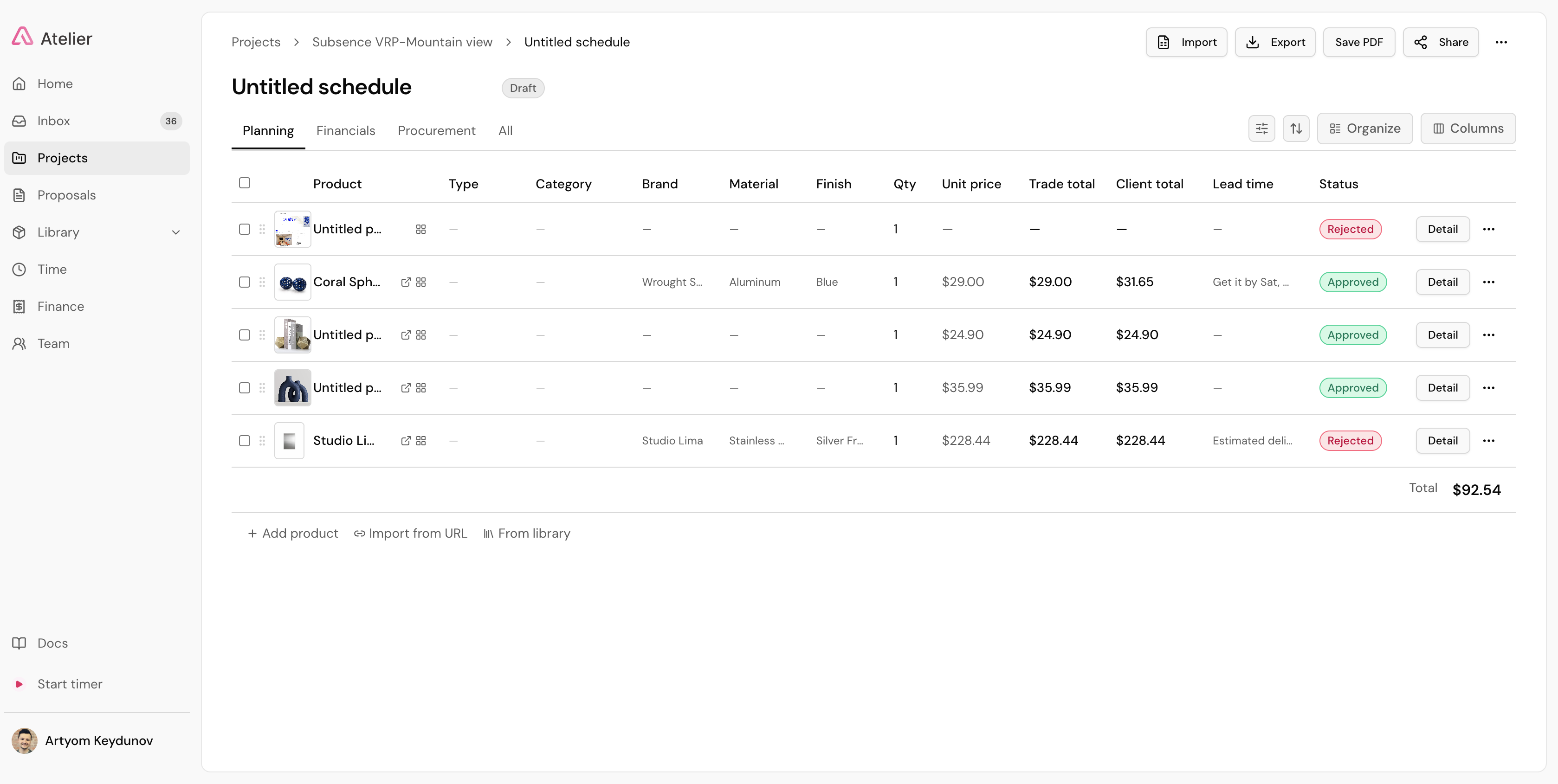
Room-by-room FF&E schedules
Turn the products you’ve chosen into structured, room-by-room schedules — quantities, finishes, lead times, and pricing in one live view, without retyping a single spec.
Sourcing without the copy-paste
Every product you pick from a supplier site lands in your library with image, price, and specs extracted — tagged, searchable, and ready to schedule.
AI Budget Analyzer
Forecasts and allocates the budget across categories from your project context, giving you estimates to plan against before the first order is placed.
Contract Phase Extractor
Upload the signed contract and Atelier reads it into proposed project phases and dates — your project plan starts itself.
Where the hours actually go
Ask a designer where a project’s time disappears and the answer is rarely the design. It is specification — the long middle where every item has to be found, captured, priced, checked, approved, ordered, tracked and invoiced.
A single FF&E line is a dense record: name, vendor, trade account and its discount, list price and client price, dimensions, finish, lead time, room, phase, an image, and a link back to the source page. Then a purchase order, a deposit, a shipment, a delivery date, an install date, an invoice line. Multiply by two or three hundred items and add a client who changes their mind in week six.
Most of that is not judgment. It is transcription. Atelier is built for interior designers and architects to take the transcription and leave you the judgment.
How a product becomes a paid line
The whole path, from the supplier page to the money, without the schedule ever being rebuilt.
- 1
Capture the product where you find it
You are on a supplier page looking at a chair you have decided on. Open the Atelier Product Clipper in the Chrome side panel and the page is read for you — name, brand, price, dimensions, finish, lead time and image land in your studio library as a structured record, with the source URL kept on it so any line can be checked against the vendor in one click.
- 2
Put it on the schedule
Add the product to a schedule and it arrives as a full line rather than a blank row: quantity, room, phase, list price and client price, with your trade discount and markup applied from the vendor account it belongs to. Nothing is retyped, because the data was captured once.
- 3
Let the budget tell you where you stand
The AI Budget Analyzer forecasts and allocates spend across categories from the project context, so you have a plan to measure against before the first order goes out — and you can see which rooms are drifting while there is still time to act.
- 4
Send it, and get a decision per line
Share the schedule as a live link. No logins for the client, no attachments, no “see version 7 in the thread below.” They comment on the specific line and approve or decline each one, so feedback arrives attached to the item it is about rather than as a paragraph you have to unpick.
- 5
Carry it through to paid
Approved lines move through one pipeline — specified, ordered, in transit, delivered, installed, invoiced, paid — and proposals and invoices generate from the same schedule rather than being rebuilt in a separate document.
You hold the taste, AI holds the grind
The boundary is deliberate, and worth stating plainly: Atelier does not pick your products and does not design for you. It works from your library and from links you supply. You choose the sofa; it does the data entry, the arithmetic and the paperwork.
That is also why extraction reads the actual vendor page rather than answering from memory. A general chatbot asked for a spec list will return plausible products at plausible prices with links that do not resolve, and checking that output costs more than writing it. Reading a real source, and keeping the source link on the line, is what makes fast capture safe rather than merely fast.
What Atelier deliberately does not do: 3D rendering or photorealistic visualization, and bookkeeping. It is not an accounting system — invoices generate from your schedules, and your books stay where they are.
Related reading
- The best FF&E specification software — how the tools compare, including where others go deeper than we do
- How to build spec lists faster — nine techniques, several of which work in any tool
- FF&E schedules without spreadsheets — why Excel breaks, and at what point
Frequently asked questions
What is an FF&E schedule?
An FF&E schedule is the structured list of every furniture, fixture and equipment item in a project — each with its vendor, price, dimensions, finish, lead time, room and phase. It is the working document a design project actually runs on: procurement, client approvals and invoicing all read from it. In Atelier the schedule is live data rather than a document, so changing a line changes what flows downstream.
How does Atelier get product data into a schedule?
You choose the product; Atelier captures it. Clip any vendor page with the Atelier Product Clipper — a Chrome side panel — and the AI reads the page and extracts name, brand, price, dimensions, finish and lead time into a structured record in your studio library. Because it reads the rendered page rather than following a per-site rule, there is no supported-vendor list to fall off. The source URL stays attached to the line so it can be verified.
Does the AI choose the products?
No. Atelier never picks your products and never designs for you. It works from products you have chosen — items in your studio library, or links you supply — and takes the labor around those decisions: the data entry, the layout, the budget maths, the documents. Product selection, spatial planning and client judgment stay with the designer.
Can I import an existing schedule or product library?
Yes. Schedules and product libraries generally export from other platforms to spreadsheet formats that Atelier can import, and Atelier exports the same way. Most studios moving from another tool finish in-flight projects where they are and start new work in Atelier, which avoids a large historical migration and the errors that come with one.
Does Atelier handle trade discounts and markup?
Yes. You can hold multiple trade accounts per vendor, each with its own discount, and the right account is applied to the right project automatically. Schedules keep list price and client price as separate values with markup, shipping and tax calculated on every line, so margin is visible per item rather than discovered at the end of a project.
Is Atelier an accounting system?
No, and it is not trying to be one. Atelier generates proposals and invoices from your schedules, but your books stay in QuickBooks or Xero — integrations with QuickBooks and Stripe are on the roadmap. If you need a full general ledger inside the same platform, a product like Studio Designer is the honest recommendation.
How much does it cost?
Atelier is $39 per seat per month billed annually, or $49 billed monthly. Every feature is on every seat — there are no tiers to outgrow — and each seat adds 150 AI credits to your studio’s shared monthly pool. There is a free trial with no credit card required and no onboarding fee.
Spend your time designing, not data-entering
Atelier speeds up your boards, forecasts your budgets, and takes the busywork off your plate — so you can focus on the work only you can do.
No credit card required.