

Boards built from products you can actually buy
Describe the room and get a composed starting board in seconds — assembled from real products, refined by chat, and connected to the schedule underneath.
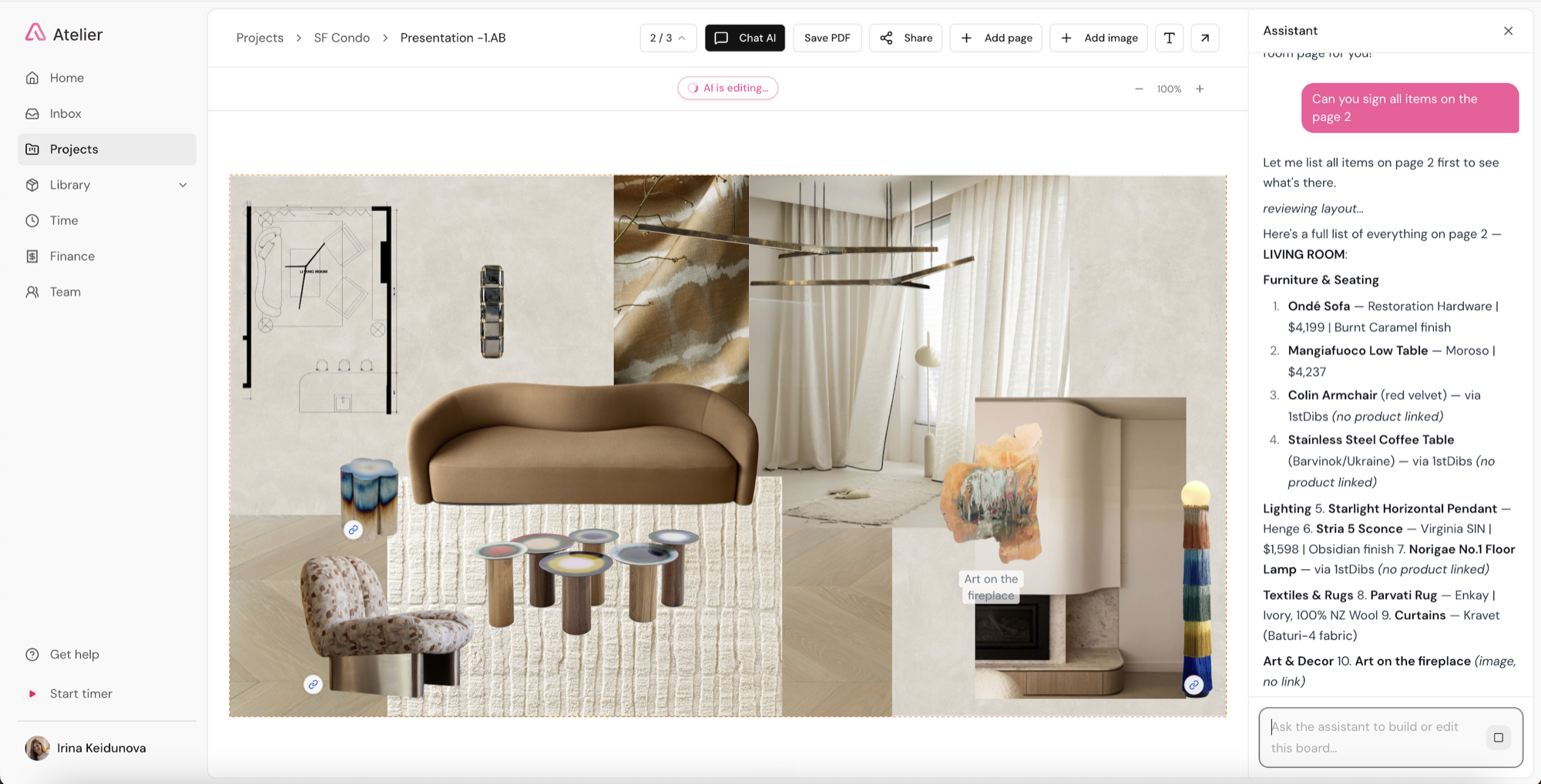
Start from a description
Tell Atelier "coastal living room — linen, warm oak, brass accents" and get a composed starting board in seconds. Layout, spacing, and grouping handled; every piece yours to keep or swap.
Refine it in chat, live
"Make it warmer." "Swap the rug." "Tighten the grid." Talk to your board while you work and watch it adjust in real time — no dragging pixels around.
Drop a link, get a product
Paste the URL of a product you've chosen and Atelier extracts the image, price, and specs straight into your studio library — ready for boards and schedules.
AI-native, not AI-added
Atelier runs on a frontier model with agentic tools that browse, extract, and assemble inside your workflow — not a chatbot pinned to the corner of a legacy app.
Two kinds of board, one name
Show a client a presentation board and a specification board and they look like the same artifact — images arranged nicely, a palette, a sense of the room. Underneath they could not be more different.
A presentation board is an image. Its job is to communicate a feeling and win agreement on a direction, and a placeholder chair with the right silhouette does that job perfectly.
A specification board is data wearing a nice outfit. Every item is a real product with a vendor, a price, dimensions, a finish and a lead time. The board is a view onto your schedule — so approving it approves actual line items, and changing it changes what gets ordered.
Atelier builds the second kind. The tell is what happens after approval: if saying yes to a board means you now go and manually build a schedule of the things on it, the board did not save you the work — it just made a nice picture of it.
Every piece is yours to keep or swap
The boundary is deliberate, and it is the first thing most designers want to know: Atelier does not pick your products and does not design for you.
Built for interior designers and architects, it works from your studio library and from links you supply. What it takes on is the labor around your decisions — arranging a composition, fitting each photo to its true aspect ratio without cropping or stretching, keeping the grid honest, and carrying every item’s price and specification through to the schedule underneath.
You hold the taste; it holds the grind. Composition is craft, but it is also an hour of nudging images into alignment, and that hour is not where your judgment lives.
Related reading
- The best mood board software — presentation tools vs specification tools, and when to use each
- Can Claude build mood boards and spec lists? — what a general assistant can and cannot do here
- What “AI-native” actually means — agents with tools versus a chat window bolted on
Frequently asked questions
Does the AI choose the products on my board?
No. Atelier assembles boards from products you have chosen — items already in your studio library, or links you supply — and handles the layout, spacing and grouping. Every piece is yours to keep or swap. It does not pick products and does not design for you: selection, spatial planning and client judgment stay with the designer.
Are the products on an Atelier pinboard real?
Yes, and that is the point. Boards are built from actual purchasable products, so every item carries a price, dimensions, a finish and a live vendor link, and the board flows straight into your FF&E schedule. This is the opposite of AI image generation, where the furniture in the picture does not exist and nothing on the board can be specified, priced or ordered.
How is this different from Canva or Milanote?
Those are presentation tools and they are very good at it — layout freedom, typography, export quality. What they cannot do is know what anything costs. A Canva board is an image, so once a client approves it every item has to be re-sourced by hand into whatever holds your specification. An Atelier board is a view onto real product data, so approving it approves actual schedule lines.
Can I still move things around manually?
Yes. The AI handles composition so you do not have to drag pixels for an hour, but the board is fully editable — move, resize, crop, group, add text and arrows, and arrange across multiple pages. Most designers let it assemble a starting layout and then adjust, which is faster than either extreme.
Does Atelier do 3D rendering or photorealistic visuals?
No. Atelier does no 3D rendering or photorealistic visualization at all. Studios that want rendered rooms pair it with a dedicated tool such as Foyr, Planner 5D or SketchUp, or use an image generator for early concepting. Atelier is built for the specification side — boards of real products that become schedules.
Do AI boards use up credits?
Composing a board is a generative action and draws on your studio’s AI credit pool; everyday chat refinements do not. Each seat adds 150 credits to a shared monthly pool — roughly 15 board builds per seat — and you see a cost preview before anything expensive runs. Purchased top-up credits roll over while you are subscribed.
Spend your time designing, not data-entering
Atelier speeds up your boards, forecasts your budgets, and takes the busywork off your plate — so you can focus on the work only you can do.
No credit card required.