

One link. Comments, sign-offs, no email chains.
Sharing work with a client should not cost you a week of chasing. Send a live link, get comments in context, and get a decision on each item instead of a thread to reconstruct.
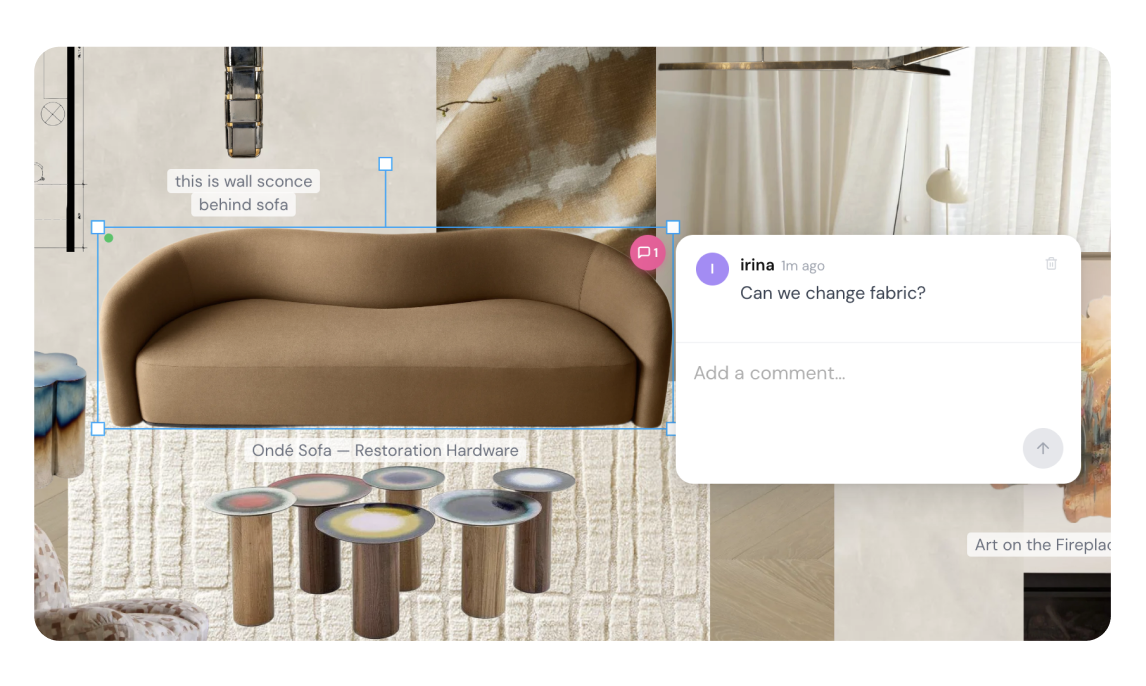
One link for everything
Share live pinboards, schedules, proposals, and invoices with a single link — no logins, no attachments, no "see version 7 in the thread below."
Comments where the work is
Clients comment directly on the board or the schedule line, so feedback lands in context instead of scattered across email.
Decisions on the item, not in an inbox
Clients approve or decline each item individually, and the decision is recorded on that item — so "which chair did they say yes to?" has an answer that lives with the work.
Always the live version
Shared links show the current state of the work — update the board and the client sees the update, not a stale PDF.
A decision per item, not a thread to reconstruct
The ordinary failure of client approval is not disagreement. It is ambiguity about which thing was agreed. Feedback arrives as “love it, but not the blue one” in a reply to an email containing eleven products, and reconstructing that later costs an afternoon.
Atelier moves the decision onto the item. A client approves or declines each pin and each schedule line individually, and comments land on the specific item rather than in a general thread — so the record of what they said sits with the thing they said it about.
What that is not: a version-pinned legal record. Atelier stores the current decision on each item, not a snapshot of what the item looked like when the decision was made, and a share link is not tied to a named individual. If you need contractual evidence of exactly what was agreed at what price, issue a proposal and keep the issued document. We would like to close that gap; today it is honest to say it is open.
Why we chose links over logins
There are two ways to build client approval, and the choice is not really about features.
Account-based portals give the client a login and a space of their own. Richer, better suited to long projects with committees and a lot of back-and-forth. The cost is a signup step, and signup steps leak — a meaningful share of clients never complete one, and the client least likely to log in is frequently the one whose sign-off you most need in writing.
Link-based approval sends a live URL. No account, no password, no app. That is the trade Atelier makes: less structure around the relationship, far less friction in getting the actual decision recorded.
Atelier is built for interior designers and architects, and it makes this trade deliberately. Neither approach is right in general. If your clients are engaged professionals who will happily maintain a login, a portal gives you more. If they are busy homeowners who reply to texts at 11pm and have never once found an email you sent twice, links will get you approvals you would otherwise still be chasing.
Related reading
- Client portal and approval software compared — the two philosophies, and where Mydoma’s portal is stronger than ours
- All-in-one studio platforms — what each one covers, and where each one stops
Frequently asked questions
Do clients need an account to approve work in Atelier?
No. Approvals work through a live link — the client clicks, sees the current state of the board, schedule, proposal or invoice, comments and signs off. There is no account to create, no password to reset and no app to install. This removes the most common failure point in client approval, which is not disagreement but a client who never completes the signup.
What does Atelier record when a client approves an item?
The decision itself, per item: approved, declined or still pending, recorded on the item rather than in an email thread, alongside any comment the client left on it. Being straight about the limit: Atelier does not currently snapshot the version an item was approved at, and the share link is not tied to a named person — so if you need contractual evidence of exactly what was agreed, issue a proposal for it and keep that document. Version-pinned approval records are something we want to add.
What can I share with a client?
Pinboards, FF&E schedules, proposals and invoices, all through the same kind of link. Because the link points at live work rather than an export, updating a board updates what the client sees. You are never re-sending a corrected PDF or explaining which version is current.
Can clients see prices and trade discounts?
Clients see the client price. Your trade discount and markup are calculated behind it and are not exposed — list price and client price are separate values in Atelier for exactly this reason. What a client sees on a shared schedule is what they would see on the invoice.
Where do client comments go?
Onto the specific item — the individual board pin or schedule line — rather than into a general discussion thread. That removes an entire class of confusion about which sofa "the blue one" refers to, and it means feedback arrives attached to the thing it is about rather than needing to be reconciled against it later.
Is this a client portal?
Not in the traditional sense, and the difference is deliberate. A portal gives the client a persistent account and a space of their own, which suits studios running long, structured client processes — Mydoma Studio is the strongest example. Atelier optimises for the opposite: zero friction to look and sign off. If a persistent client-owned space is central to how you work, a portal-first platform is the better fit.
Spend your time designing, not data-entering
Atelier speeds up your boards, forecasts your budgets, and takes the busywork off your plate — so you can focus on the work only you can do.
No credit card required.